If your organization is among the many that have struggled with the administrative headaches and costs of IPSec VPNs, going "clientless" sounds compelling. Given the demand for secure, easy, anytime/anywhere remote access for travelers and home office workers, the surge of interest in SSL/TLS-based VPNs isn't surprising. The key is deciding when to use IPSec and when to use SSL.
In choosing an SSL VPN over IPSec, Torre wanted to avoid the overhead of installing client software and to leverage one of SSL's strengths--access to specific applications, rather than entire subnets."It's not that one is right and one is wrong," says Doug Torre, who is rolling out
Neoteris SSL VPNs to give 500 doctors and clinicians remote access to medical applications and patient information for Catholic Health System of Western New York in Buffalo. "IPSec and SSL VPNs both solve the problem, but SSL was a more tailored fit for us." Torre still uses IPSec VPNs for site-to-site connections, such as connecting remote sites to the core network.
"We're getting access to the exact thing we need, which is the application," says Torre, director of networking and technical services for Catholic Health System, which includes four hospitals and a number of long-term health care facilities.
Does all this mean that SSL VPNs are the way to go? Everything being equal, who wouldn't want to reduce the cost of VPN ownership by eliminating client installation and configuration and centralizing policy administration, enforcement and access control?
It's not that simple, of course. Vendors promise to deliver secure access, but are SSL VPNs as secure and reliable as IPSec? Where do SSL VPNs fit into your network security policies, and which remote user communities can they best serve? What does it really take to install and administer an SSL VPN?
Securing Remote Access
Both IPSec and SSL VPNs can provide enterprise-level secure remote access, but they do so in fundamentally different ways. These differences directly impact both application and security services, and shape the factors that will influence your decision on which technology to deploy, and where.
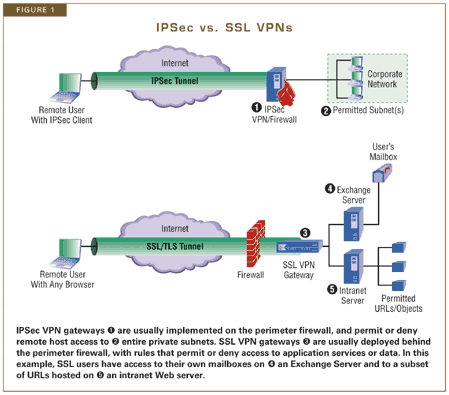
IPSec VPNs protect IP packets exchanged between remote networks or hosts and an IPSec gateway located at the edge of your private network. SSL VPN products protect application streams from remote users to an SSL gateway. In other words, IPSec connects hosts to entire private networks, while SSL VPNs connect users to services and applications inside those networks.
IPSec VPNs can support all IP-based applications--to an IPSec VPN product, all IP packets are the same. SSL VPN application services vary, because each product has its own way of presenting client interfaces through browsers, relaying application streams through the gateway, and integrating with destination servers inside the private network. Most SSL VPNs provide secure access to Microsoft Outlook Webmail, network file shares and other common business applications. However, they often require custom development to support nonbrowser-based apps.
Before you choose to deploy either--or both--you'll want to know how SSL and IPSec VPNs stack up as security solutions, and what price you have to pay for that security in administrative overhead.
First, we'll compare how IPSec and SSL VPNs address three essential security requirements:
- Authentication and access control. Each VPN type presents different options for user authentication, with clear implications for security. The fundamental difference in how SSL and IPSec VPNs implement access control is an important consideration in where and how each technology is best applied.
- Defense against attack. Strong data confidentiality and integrity, and resistance to message replay and other attacks, are essential to make a VPN secure.
- Client security. The tunnel can't be secure if the host client is compromised. VPN client computers need strong AV and firewall protection, and admins need a way to check on the "health" of those systems.
Next, we'll look at what it takes to configure and administer both IPSec and SSL VPNs, and the payoff for what you put into it:
- Client vs. clientless. It's not necessarily a clear-cut choice: IPSec client administration and policy distribution headaches vs. SSL app customization.
- Integrating VPN gateways into your network. VPN gateways have to fit in to your network and play nicely with your app servers. What does it take?
Access Control and Authentication
Both SSL and IPSec VPNs support a range of user authentication methods, including certificates. However, if you choose a noncertificate option (such as password or tokens), you should be aware that the IPSec choices, as we'll see, are generally more vulnerable than the SSL alternatives.
Accepted security best practices include allowing only that which is expressly permitted, denying all others. In a nutshell, SSL VPNs tend to be deployed with more granular access controls than IPSec, but that also means admins may spend more time configuring and modifying individual and group access rules.
Authentication. IPSec employs Internet Key Exchange (IKE), using digital certificates or preshared secrets for two-way authentication; SSL Web servers always authenticate with digital certificates, no matter what method is used to authenticate the SSL client. Both support certificate-based user authentication, though each offers less expensive options through individual vendor extensions. They differ significantly on how these extensions are implemented, and SSL is the more secure solution for companies that decide to implement noncertificate user authentication.
IPSec vendors, for example, offer alternatives such as Extended Authentication (XAUTH) and L2TP over IPSec. However, XAUTH, which is frequently deployed using preshared group secrets and DHCP, is vulnerable to several known attacks. And while L2TP over IPSec is embedded in Windows 2000/XP, it isn't broadly supported by VPN gateways or used by non-Microsoft shops.
Most SSL vendors support passwords and tokens as extensions. Further, SSL's encrypted tunnel protects the user's identity and credentials, making asymmetric authentication more secure than IPSec with XAUTH.
SSL is better suited for scenarios where trust is limited or where installed certificates are infeasible--business partner desktops, public kiosk PCs and personal home computers.
Access control. If you really need per-user, per-application access control, go SSL. If you need to give trusted user groups homogenous access to entire private servers and subnets, go IPSec.
IPSec standards support "selectors"--packet filters that permit, encrypt or block traffic to individual destinations or applications. As a practical matter, most organizations grant hosts access to entire subnets, rather than keep up with the headaches of creating/modifying selectors for each IP address change or new app.
SSL VPN products tend to provide more granular tools--how granular varies from product to product--but how you use them (and how much administrative cost you're prepared to shoulder) is up to you. Because they operate at the session layer, SSL VPNs can filter on and make decisions about user or group access to individual applications (ports), selected URLs, embedded objects, application commands and even content.
Defense Against Attack
Both SSL and IPSec support block encryption algorithms like TripleDES Cipher Block Chaining, which are commonly used in VPNs. SSL VPNs also support stream encryption algorithms like RC4 that are often used for Web browsing. Given comparable key lengths, block encryption is less vulnerable to traffic analysis than stream encryption.
If you're implementing an SSL VPN, try to choose products that support TLS, which is slightly stronger than the older SSLv3. TLS eliminates older key exchange and message integrity options, ensuring strong defense against key cracking and forgery.
In addition to strong encryption support, both types of VPNs are built to resist common Internet attacks. However, there are some important differences that can impact security, performance and operability. They include:
Man in the middle. IPSec prevents packet modification to thwart man-in-the-middle attacks. However, this strong security feature also generates operational problems. NAT frequently breaks IPSec because it modifies packets by substituting public IP addresses for private ones. Many IPSec products implement NAT traversal extensions, but support for this feature isn't universal, and interoperability is still an issue.
SSL is almost as tough against man-in-the-middle attacks, without IPSec's NAT conflict. SSL rides on TCP, so it's insulated from IP and port modifications, and thus passes easily through NAT. SSL carries sequence numbers inside encrypted packets to prevent packet injection, and TLS uses message authentication to detect payload changes.
Message replay. Both IPSec and SSL use sequencing to detect and resist message replay attacks. IPSec is more efficient, because it discards out-of-order packets lower in the stack in system code. In SSL VPNs, out-of-order packets are detected by the TCP session engine or the SSL proxy engine, wasting more resources before they are discarded. This is one reason why IPSec is broadly used for site-to-site VPNs, where raw horsepower is critical to accommodate high-volume, low-latency needs.
Denial of service. IPSec has a slight advantage against DoS attacks, such as packet floods, because it uses only datagrams, while SSL uses TCP sessions. This is because IP and UDP (IKE) datagram floods are conceptually easier to deflect than TCP SYN floods, which fill session tables and cripple many off-the-shelf protocol stacks.
Every product must be hardened against DoS attacks. Look carefully at individual products and published third-party test results to assess DoS vulnerability in each implementation.
Business-grade IPSec VPN appliances have been hardened against DoS attack; some IPSec vendors have even published DoS test results. While IPSec VPNs have been subject to testing for years, a certification program for SSL VPNs has just been initiated.
ICSA Labs is launching a SSL/TLS certification program, and expects to complete first-round testing of crypto implementation and baseline features by year's end.
Client Security
Your VPN--IPSec or SSL--is only as secure as the laptops, PCs or PDAs connected to it. Without precautions, any client device can be used to attack your network.
Therefore, companies implementing any kind of VPN should mandate complementary client security measures, such as personal firewalls, malware scanning, intrusion prevention, OS authentication and file encryption. Some IPSec VPN clients include integrated desktop security products to restrict access to systems that conform to organizational security policies. For example,
Check Point Software Technologies' VPN-1 is integrated with
PestPatrol, and
WatchGuard Technologies' Mobile User VPN with
Zone Labs' ZoneAlarm.
SSL client devices present their own set of problems. Because SSL VPNs are often accessed by computers outside a company's control--public computers are a particular challenge--vendors address their security requirements in several ways. For example:
- Many SSL VPNs, including Whale Communications' e-Gap and Aventail's EX-1500, provide secure browser/client logoff by wiping all traces of activity--cached credentials, cached Web pages, temporary files and cookies--from the public computers.
- Nokia's Secure Access System checks client-side security by instructing the browser to run an applet that looks for open ports and verifies antivirus presence before the gateway accepts remote access requests.
- Some SSL VPNs combine client security with access rules. For example,Permeo Technologies' Application Security offers methods that filter individual application commands (e.g., FTP GET but not PUT; no retrieving HTTP objects ending in .exe). This could narrow permissions given to users that only merit "partial trust" because they use client computers that lie outside your organization's control. Nokia's Secure Access System can limit application features and functions, depending on the system from which a VPN session is initiated. For example, public kiosks may be restricted from uploading files that company laptops are permitted to access.
Session state is a dimension of usability more than security, but it's worth noting that both IPSec and SSL VPN products often run configurable "keepalives" that detect when the tunnel has gone away. Both kinds of tunnels are disconnected if the client loses network connectivity or the tunnel times out due to inactivity. Different methodologies are used due to different locations in the protocol stack, but they have the same net effect on users.
Client vs. Clientless?
The primary allure of SSL VPNs is their use of standard browsers rather than having to install client software, but there are a number of factors to consider.
SSL VPNs do a great job making browser-based apps available to remote devices. However, generally speaking, the more diverse the application mix, the more attractive IPSec appears. It boils down to a trade-off between IPSec client installation and SSL VPN customization. Let's examine this in more detail.
"Clientless" isn't entirely accurate. The extent to which applications can or should be "Webified" is a wild card for SSL VPNs. If you can find an SSL VPN product that meets all or most of your application needs, great. If not, you may spend more time and effort developing custom Java/ActiveX plug-ins than you would have supporting an IPSec VPN.
Although SSL VPN tunnels are launched through from the user's browser, often a desktop agent--a Java applet or ActiveX control--must be downloaded for access to thin client, client/server or other applications that don't lend themselves to Web page presentation (e.g., Citrix, IBM green screen, Windows Terminal Service). Moreover, applications that require Java applets or ActiveX controls and plug-ins may conflict with a browser security policy that prohibits active content. Most organizations block "unsigned" Java/ActiveX, which can be used to install Trojans, retrieve or delete files, etc. Some organizations block all active content to be on the safe side. As a result, you may have to reconfigure some browser clients to use an SSL VPN.
And don't dismiss the "user factor." People grow accustomed to existing user interfaces. The advantage of having browser interfaces for native apps may be offset by the time spent reeducating unhappy users.
SSL VPN vendors have a range of approaches on Webification. Some products such as Permeo's Application Security, Aventail's EX-1500 and Nokia's Secure Access System use client-side code to support a more native representation of application interfaces. Conversely, solutions such as Neoteris' Instant Virtual Extranet,
Netilla Networks' Security Platform and Whale's e-Gap are more inclined to Webify applications, even if that means some apps will require backend development to bolt them onto the VPN server.
Most IPSec deployments still require third-party client software. Installing third-party clients is time consuming and requires access to the users' desktops. The problem is exacerbated when you factor in the increased need to service home computers and partner sites. In addition, while client software quality and compatibility have improved considerably, there are still conflicts--particularly with hardware drivers.
IPSec VPN clients are now embedded in newer OSes such as Win2K/XP and Mac OS X. But these clients aren't as feature-rich as third-party offerings. Moreover, IPSec clients aren't widely available for older Windows, *nix, Mac and handheld OSes.
Some vendors offer hardware IPSec VPN clients for organizations that must deal with diverse OS platforms. Small appliances, like
Cisco Systems' VPN 3002, sit between a worker's home PC and cable/DSL modem, acting like an IPSec VPN client. The idea is to invest in hardware up-front to avoid ongoing costs of administering remotely deployed VPN software.
Organizations sometimes use IPSec-enabled SOHO firewall appliances to incorporate teleworkers' LANs into their site-to-site VPN topology, but this solution often pushes the problems of scale and remote administration from remote access to the VPN backbone.
Policy distribution and maintenance are often hamstrung by user mobility and intermittent connectivity. This is a significant issue for IPSec VPNs. Whenever users get involved in security configuration or debugging, there's also an increased risk of error or unauthorized change.
IPSec administrators must create security policies for each authorized network connection, identifying such esoteric information as IKE Identity, Diffie-Hellman Group, crypto algorithms and security association lifetimes. IPSec vendors like Cisco, Check Point,
NetScreen Technologies and
Avayahave created proprietary, centralized policy management systems that automate policy distribution. These systems help, but keeping policy synchronized across large IPSec VPNs can still be tough.
"We found supporting remote clients over an IPSec VPN to be problematic due to the need for configuring VPN and application software, making securing it a bit tricky," says Catholic Health System's Torre.
For the most part, security policy for SSL VPNs is implemented and enforced at the gateway (SSL proxy). Thus, there's no user involvement and no client policy to remotely manage.
Integrating VPN Gateways
Server-side issues tend to get lost amid the buzz about clientless savings, but understanding what's involved is essential in VPN product selection, secure solution design and cost-effective deployment.
Whether you choose IPSec or SSL, your VPN gateway will be where the rubber meets the road. Significant server-side VPN administration is inevitable for both. Network integration is an issue for IPSec gateways, while SSL VPN gateways tend to have a greater impact on how you administer your app servers.
IPSec remote hosts become part of your private network, making integration more challenging than with SSL VPNs. The IPSec design tasks that burn the most IT cycles include:
- Address assignment. IPSec tunnels have two addresses. Outer addresses come from the network where the tunnel starts (e.g., the ISP). Inner addresses are used to correctly route traffic once it gets past the VPN gateway, inside the protected network. Admins have to invest time assigning these addresses to VPN clients and making routing changes on firewalls and inside the network.
- Traffic classification. Deciding what and what not to protect, then configuring selectors to match that objective, takes time. For example, "HR clients should be able to reach the HR server," must be mapped into the right set of users and destination subnets/servers/ports.
- Routing. Adding a VPN gateway changes network routes. You'll spend time deciding how client traffic should be routed to and from the VPN gateway, and determining if NAT will interfere with your deployment.
SSL VPNs don't require client address assignment or changes to routing inside your network, because they control access to applications and content (e.g., URLs) rather than network-layer entities, such as subnets and hosts. Typically, SSL VPN gateways are deployed behind a perimeter firewall, which requires punching a hole through that firewall to deliver SSL to the VPN gateway. This means delegating trust from the firewall to the VPN gateway, which enforces security policy on SSL-encrypted streams.
SSL VPN gateways have greater potential impact on the application servers inside your private network. On most intranet servers, when IT staff need to restrict access at a finer-than-firewall granularity (e.g., control user access to a directory on a Web server), they must apply OS-level access controls (e.g., Windows NTFS) and per-user or per-application authentication on the servers themselves.
IPSec VPNs can't offload these security services from individual servers.
By applying very granular access controls at SSL VPNs gateways, organizations can eliminate duplicate processing from intranet servers. This also allows an organization to enforce uniform policy at the gateway. Some products, such as Whale's e-Gap and Aventail's EX-1500, can provide single sign-on capability for all intranet servers protected by a VPN gateway (see "
E-mail from Anywhere").
But SSL's fine-grained access controls come at a price: Extreme granularity means more planning, configuration and verification, which translates into overhead and, sometimes, error. First- time SSL VPN adopters are advised to keep things simple by applying easily managed individual user authentication and group access controls.
The Test of Time
Are SSL and IPSec VPNs complementary or competing remote access solutions? There may be room for both.
"We think that classic IPSec VPNs are great for connecting to the network, such as hooking up remote sites to each other, or for the power user who needs every tool in the toolbox, like an IT user," says Catholic Health System's Torre. "For the average user, however, it's overkill."
"Power users like the idea of a full PC-to-gateway IPSec VPN, and often believe they need access to the full IP spectrum of the enterprise network from their home office," says Fred Avolio, president and founder of
Avolio Consulting. "But many, if not most, occasional teleworkers often use home PCs and only need to access services that are easily available through a Web browser, such as e-mail and file access. An SSL VPN gives them secure access without the hassle of a hard-to-configure client."
It's quite likely that IPSec will remain attractive to organizations with broader needs than Web apps. As user constituencies become larger and more diverse, assets must be separated at finer granularity, making SSL more attractive. Today, SSL VPN adoption is driven by tight IT budgets and vendor promises to reduce total cost of ownership. As SSL VPN products mature, they must deliver on this promise in large successful deployments, grow their turnkey support for common business applications, and demonstrate their ability to withstand Internet threats and enterprise performance demands. If they can do all this, SSL will give IPSec a real run for the money in the remote access VPN market.