compliance features
- allows a search of mailboxes through the organization preview of search results and then copy of results to a Discovery mailbox
- In-Place Hold forces a hold on data discovered during in-place eDiscovery
- Legal-Hold or Litigation Hold places entire mailbox on hold. To be deprecated but still available on Exch 2013. It lacks flexibility and granularity compare to In-Place hold.
Auditing
- keeps an audit of all actions taken on all mailboxes
- auditing is done based on access by owners, delegates and administrators
- you can run various reports on mailboxes, roles/permissions granted, etc (exp. administrator role group report)
Transport Rules
Allows you to create conditions, actions and exceptions over mail that is flowing through your organization. keep a copy of emails, disclosure signature, prevent flow of email based on criteria, etc.
Data Loss Prevention (DLP)
- A form of transport rule that prevents users or alerts users from sending sensative information like credit card numbers.
- based on regulatory standards (PII amd PCI-DSS)
Messaging Records Management (MRM)
- revolve around email lifecycle policies.
- retention policies are used to classify messages
Journaling
- provides the ability to retain copies of all imcoming and outgoing mail through standard journaling
- Provides more granular journaling through Premium Journaling. Can specify what to journal instead all emails.
Information Rights Management (IRM)
- works in harmony with Active Directory Rights Management Services (Ad RMS) to protect messages and attachments. Prevent msg from forwarding, printing, etc. a deterrent instead of all full protection. can be worked around the protection.
In-Place Archiving
- Eliminate the proliferation of PST files

Compliance Features

Transport Rules

In-Place Archiving

In-Place ediscovery search

Specifiy a single mailbox or all mailboxes

query for keywoards

Place hold on search results


results of the search
Reports


Changes to admin role groups report.

actions by who is logged.

Allow user to manage content.

User mailbox can have only one retnetion policy.

policy has retention tags users can use.

Retention tags are modifiable.

New tags configuration
Journal Rule

source of emial to be journaled.
and mailbox to send the journal reports to,.

Journal internal, external or all messages.
Scenario
enable default retention policy and in-place archive over Tim Berry
Establish a standard journaling rule for all email going in and out of the organization
place Wendy Lindsay's mailbox on Litigation Hold


enable in-place archiving.

assign database to store the archive

In-place archiving and retention policy do not take effect immediately.
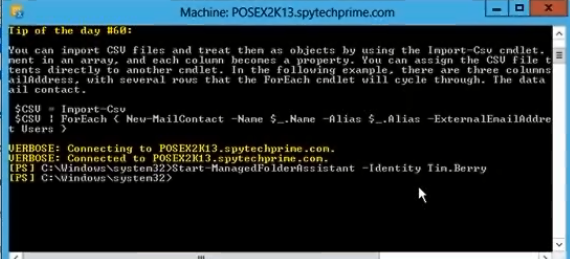
force folder assistant to process the archiving and retention policy

Online Archiving.; Manually moved or retention tags used.


1 week delete retention polcy set for this email

email archive policy for 5 years
Journling rule

create a journaling mailbox for all incoming/outgoing emails to be retained.
it may need its own mailbox database to store many emails

create a new jourmal rule to use the journal mailbox
Legal Hold


inform user that legal hold. user may delete emials but emails are still kept.
it is deprecated feature so use In-Place hold.
In-Place hold

In-Place hold is configured through compliance management eDiscovery search


The search resullt for user mailbox is placed on in-place hold.